Custom Expiry Times and Notifications
Set how far in advance expiry reminders are sent and configure custom instructions
Expiry reminders just got a glow-up. ✨
You can now choose when expiry reminders go out and customize the message parkers receive.
What’s new?
Previously, expiry reminders used a fixed timing of 15 minutes before permit expiry. Now, teams can set reminder timing that better matches the permit type, whether it is a quick short-term permit or a longer-term pass.
Set Expiry Reminder Times
You can set expiry reminder timing in two places:
Company default
Go to Offstreet > Company > Support and update the Default Expiry Reminder Time.
This becomes the default reminder timing for new permit types.

Permit type override
Go to Permits > Open Permit Type > Settings and update the Expiry Reminder Time for that permit type.
This lets you use a different reminder time for specific permit types.
Events override
Go to Events > Open Event > Settings and update the Expiry Reminder Time for that permit type.
This lets you use a different reminder time for specific permit types.
How reminder times work
- All existing Permit Types and Events are set to the current default of 15 minutes and can be adjust manually
- If a new permit type or Event is created, the expiry reminder time will default to the company setting but can be adjusted during the setup wizard:
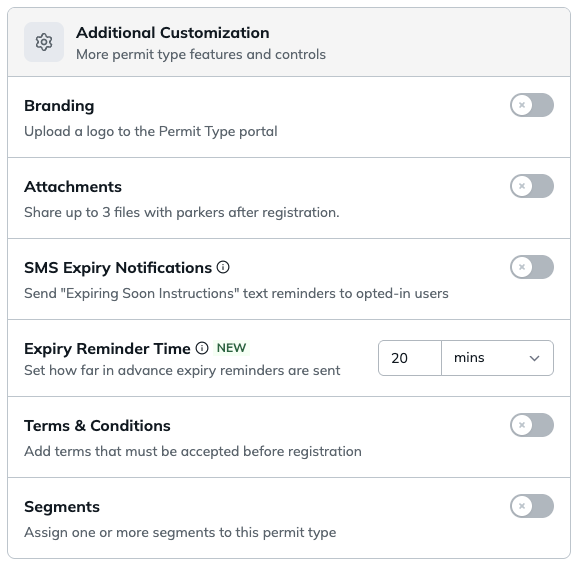
- Reminder times can be set in minutes, hours, days, or weeks
- SMS reminders can be enabled or disabled at a Location, Tenant, Permit Type, and Event level
Custom reminder messaging
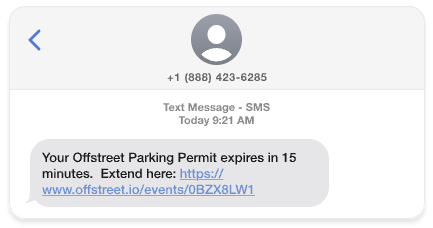
Expiry reminder messaging can also be customized so parkers receive clearer, more helpful instructions.
SMS Reminder
Email Reminder
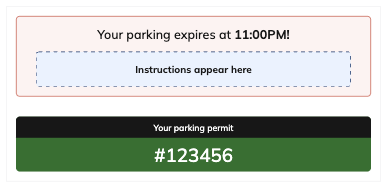
You can customize Expiring Soon Email/SMS Instructions at the following levels:
Permit Type
- Details > Settings > Instructions
Tenant
- Details > Portal > Instructions
Location/Event
- Details > Instructions
Was this article helpful?
That’s Great!
Thank you for your feedback
Sorry! We couldn't be helpful
Thank you for your feedback
Feedback sent
We appreciate your effort and will try to fix the article