Vehicle Lookup & Active Vehicles
A quick reference for finding, filtering, and reviewing permits and registrations in the Offstreet Dashboard.
Overview
Vehicle Lookup and Active Vehicles help you quickly find permits and registrations across your locations.
- Vehicle Lookup is best for searching specific vehicles or permits.
- Active Vehicles is best for viewing what is currently valid at a specific location.
Both tools include improved search, filtering, and performance to help you find what you need faster.
When to Use Each
Vehicle Lookup
Use Vehicle Lookup when you know something specific and want to find it quickly.
- Looking up a license plate
- Finding a confirmation number
- Searching by registration code or additional info
- Investigating a specific permit or vehicle
Active Vehicles
Use Active Vehicles when you want a real-time view of what is valid at a location.
- Seeing all active vehicles at a location
- Monitoring usage or occupancy
- Spot-checking enforcement activity
- Reviewing permits without needing to search first
How It Works
Vehicle Lookup
Vehicle Lookup lets you search across permits and registrations using the information you already have. It is designed for quick investigation and flexible searching.
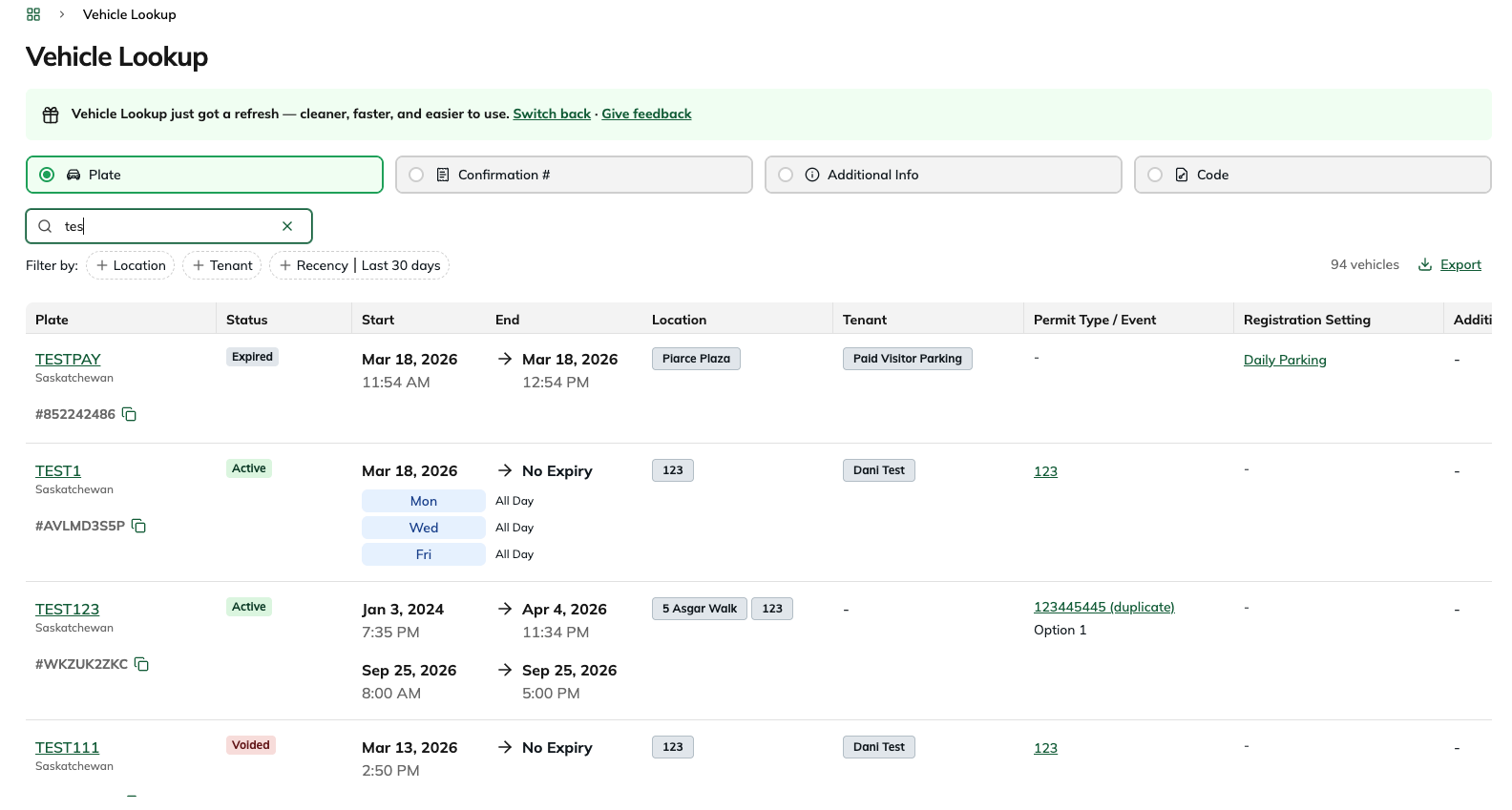
You can search by:
- Plate
- Confirmation Number
- Code (if configured)
- Additional Info (if configured)
You can perform full or partial searches, as long as you enter at least 2 characters.
Available filters include:
- Location
- Tenant
- Recency, such as the last 30 days
Each result includes key permit details such as status, start and end time, location, tenant, Permit Type or Event, Registration Setting, and any configured details that apply to the record. You can also export the results for reporting or further analysis.
Active Vehicles
Active Vehicles is best used for monitoring what is valid on-site in real time, with the flexibility to explore upcoming, expired, or void permits when needed.
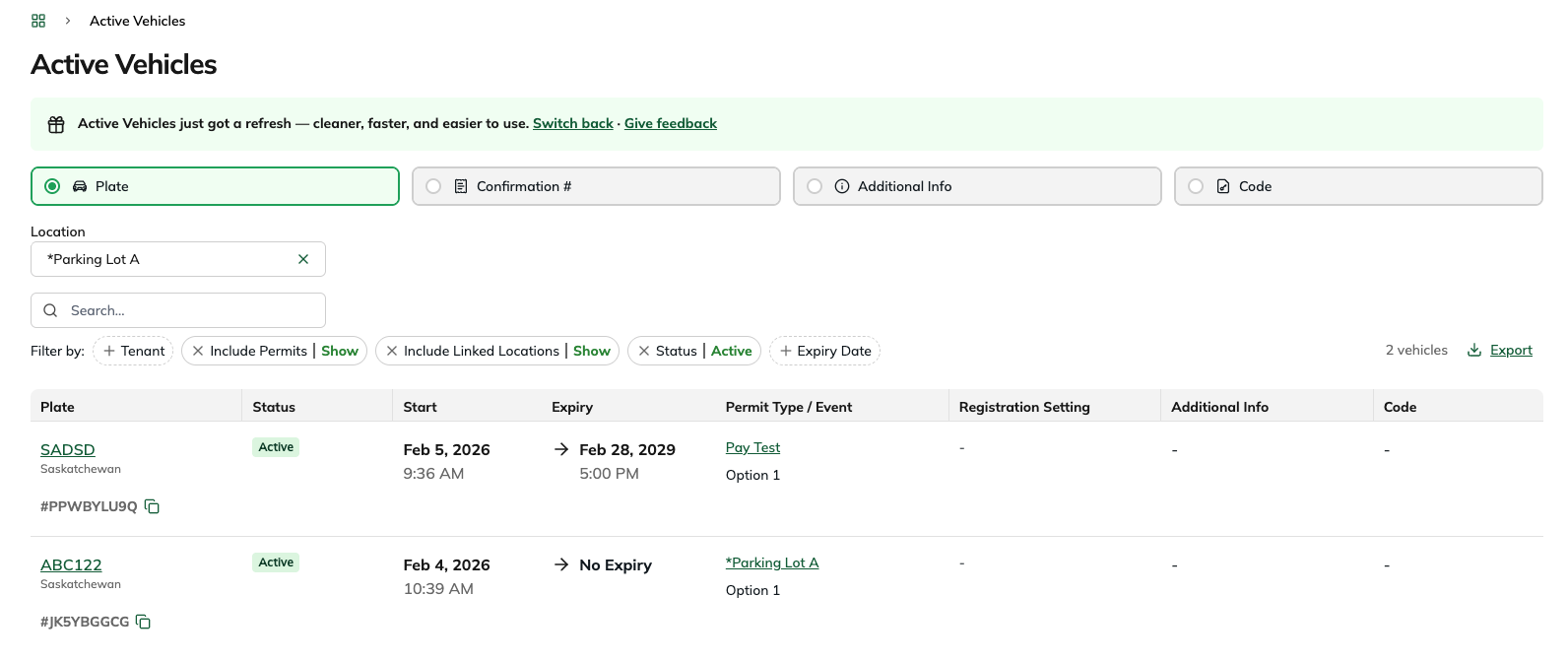
By default, Active Vehicles shows all currently active permits at the selected location.
You can also filter by status to view:
- Active (default)
- Upcoming
- Expired
- Void
This allows you to view all permits that fall under a specific status, not just what is currently active.
Within Active Vehicles, you can search by:
- Plate
- Confirmation Number
- Code (if configured)
- Additional Info (if configured)
You can perform full or partial searches here as well, as long as you enter at least 2 characters.
Available filters include:
- Location (required)
- Tenant
- Status, including Active, Upcoming, Expired, and Void
- Expiry Date, including Is After, Is Before, Is Between, and Is Equal To
You can also adjust Include Permits and Include Linked Locations depending on your setup, and export the filtered results for reporting or further analysis.
What Could I Use This For?
Vehicle Lookup
- Confirm whether a specific vehicle has a valid or expired permit
- Search using a confirmation number provided by a parker
- Find a permit when you only have part of a plate or code
- Review permit details across multiple locations or tenants
Active Vehicles
- Monitor which vehicles are currently valid at a specific location and/or tenant
- View a complete list of permits at a location, rather than searching for a single record
- Filter permits by status, including active, upcoming, expired, or void
- Get a full snapshot of permit activity across a location at any given time
FAQs
What is the difference between Vehicle Lookup and Active Vehicles?
Vehicle Lookup is best when you want to find a specific permit or registration using details like a plate or confirmation number. Active Vehicles is best when you want to view permits by location and monitor what is active, upcoming, expired, or void.
Can I perform a partial search?
Yes. Both Vehicle Lookup and Active Vehicles support partial searches. Enter at least 2 characters to begin searching.
Why do I not see results searching by Code or Additional Info as search options?
These fields only appear if they have been configured in your Event, Permit Type, or Registration Setting setup.
Can I export my results?
Yes. Both Vehicle Lookup and Active Vehicles includes an export option so you can download your results for reporting or analysis.
Was this article helpful?
That’s Great!
Thank you for your feedback
Sorry! We couldn't be helpful
Thank you for your feedback
Feedback sent
We appreciate your effort and will try to fix the article