Usage Controls
Usage Controls help you manage parking capacity and define how permits can be used.
They can limit:
- How many permits overlap at the same time
- How many permits can start during a period
- How often the same vehicle can receive a permit
- How much parking time a vehicle or registration code can use
- How many plates can be added to a permit
Controls can apply at different levels:
- Permit Type: applies to everyone using that Permit Type.
- Parking Option: applies to one specific Parking Option.
- Tenant on a Permit Type: applies to one tenant in one Permit Type.
- Tenant: applies to one tenant across all Permit Types.
- Location: applies to all permits at one parking location.
When more than one rule applies, a permit registration must meet all of them.
Permit Type Usage Controls
Permit Type rules apply across all Parking Options within that Permit Type, unless a rule is configured specifically for one Parking Option.
Use these controls when you want a rule to apply to a Permit Type (and its applicable Options).
Active Permit Limit
Use it to: Limit how many permits can overlap at the same time.
Where it applies: The entire Permit Type and all of its Parking Options.
How it works: This is a capacity limit. It looks at the requested parking time—not when someone submits a registration. A permit ending at 10:00 AM does not overlap a permit starting at 10:00 AM.

Example: A Permit Type has an Active Permit Limit of 50. If 50 permits are valid from 9:00 AM to 10:00 AM, another permit for that hour cannot be issued. A permit from 10:00 AM to 11:00 AM may be issued because it does not overlap.
Active Permit Limit: Parking Options
Use it to: Give one Parking Option its own capacity limit.
Where it applies: only the selected Parking Option. The Permit Type limit still applies across all of its options.
How it works: both limits must have capacity.
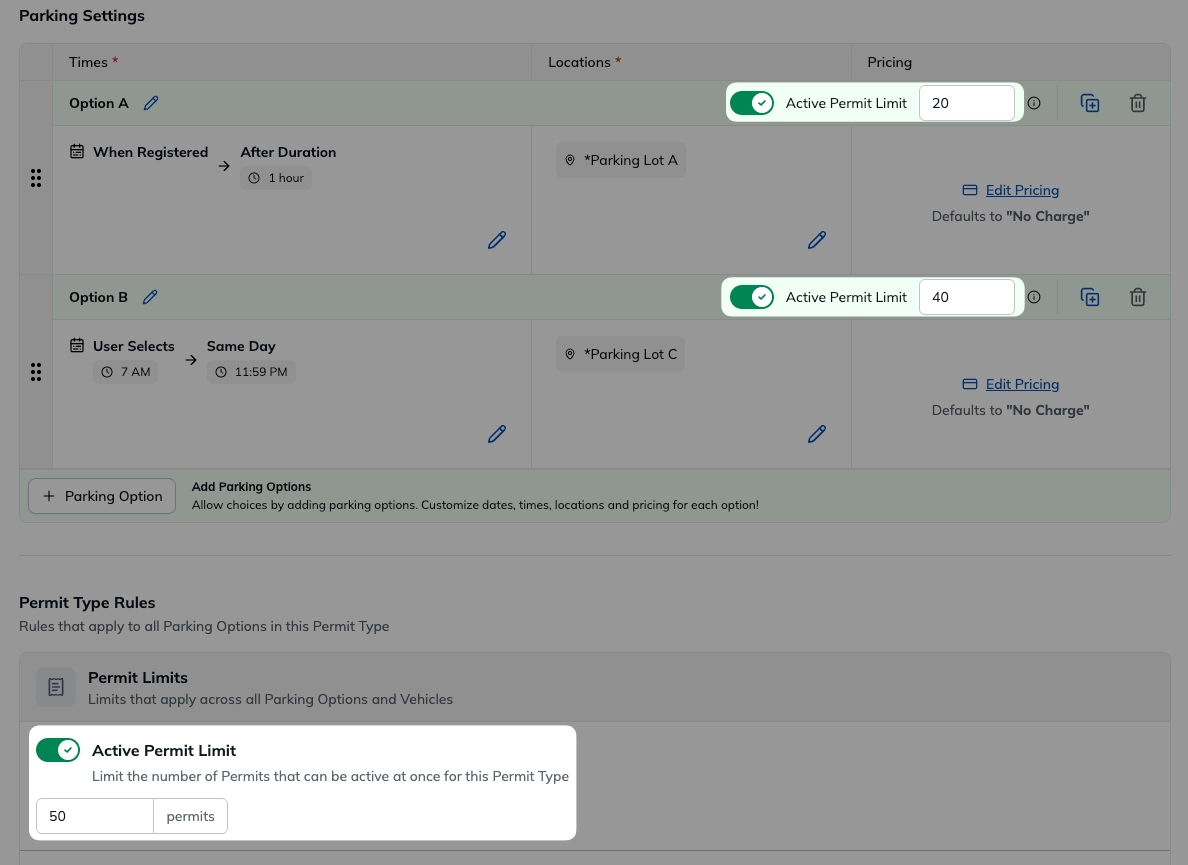
When both limits are configured, the most restrictive applicable limit is enforced.
Example:
- Permit Type limit: 50 permits
- Parking Option A limit: 20 permits
- Parking Option B limit: 40 permits
Parking Option A can have up to 20 overlapping permits. Parking Option B can have up to 40. Together, both options can have up to 50 because they share the Permit Type limit.
Maximum Permit Limit
Use it to: limit how many permits can start during a period.
Where it applies: a Permit Type, or a tenant on a Permit Type.
How it works: each permit is counted once using its start time. This is different from Active Permit Limit: it counts permits that start in a period, not permits that overlap at one time.
Example: a Permit Type has a Maximum Permit Limit of 100 per month. Once 100 permits with start times in that month have been issued, no more permits can start that month.
Max Plates per Permit
Use it to: limit how many license plates can be added to a single permit.
Where it applies: the Permit Type.
How it works: every plate added to the permit counts toward this limit. You can allow up to four plates per permit.

All plates associated with the permit are considered active for enforcement. How multiple plates are handled by enforcement may vary depending on your integration.
Example: A limit of 3 allows up to three license plates on one permit.
Repeat Vehicle Limit
Use it to: limit how many permits the same license plate can start during a period.
Where it applies: a Permit Type, a tenant on a Permit Type, or a tenant across all Permit Types.
How it works: the limit counts permits by their start time, not by when a registration is submitted.
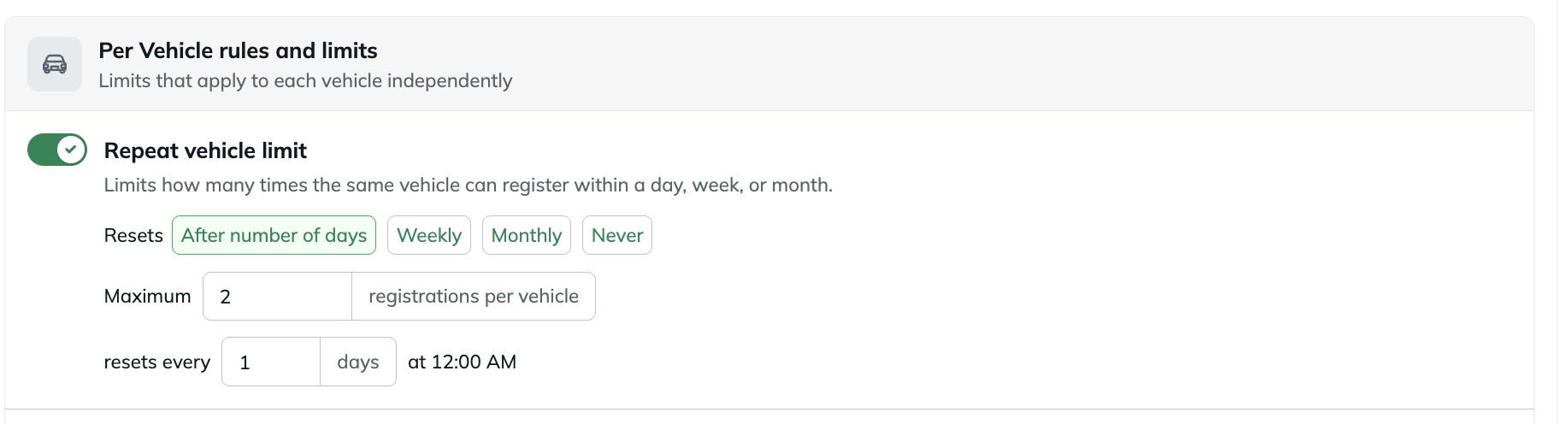
Choose the maximum number of permits and the period:
- After a specified number of days
- Weekly
- Monthly
- Never
Example: a limit of 2 permits per week allows a license plate to start up to two permits in that week. A third permit cannot start until the next weekly period.
For weekly limits, you can choose which day starts the week.
Time per Vehicle
Use it to: limit the total parking time used by the same license plate during a period.
Where it applies: a Permit Type, a tenant on a Permit Type, or a tenant across all Permit Types.
How it works: this rule measures parking time, not the number of permits. A vehicle can use its allowance in one permit or across several permits. If permits for the same plate overlap, the shared parking time is counted once.
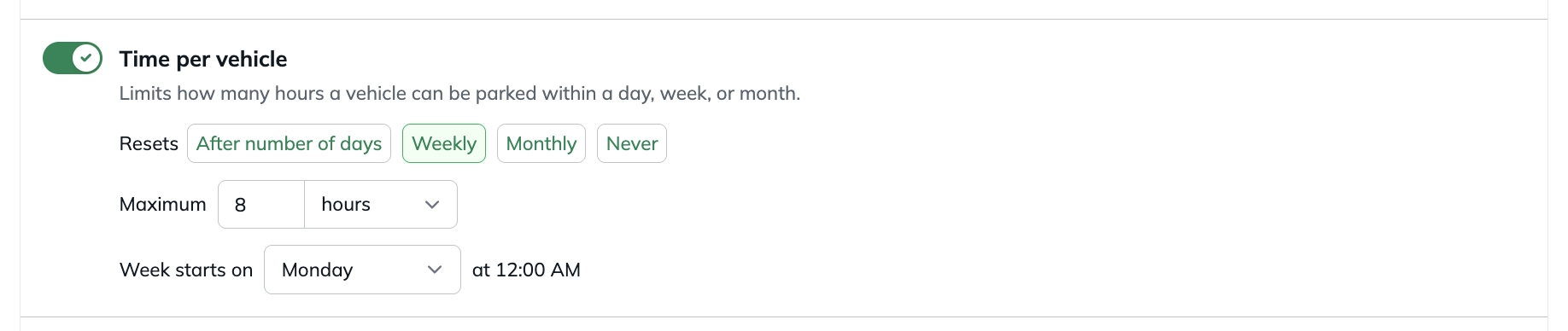
Example: A limit of 8 hours per vehicle each week allows a plate to use eight hours in one permit or several permits. After eight hours have been used, additional parking time is unavailable in that week.
Time per Code
Use it to: limit the total parking time available through a registration code during a period.
Where it applies: the Permit Type. Each registration code has its own allowance.
How it works: time is counted for every license plate on a permit. Unlike Time per Vehicle, overlapping permit time is added together for this limit.
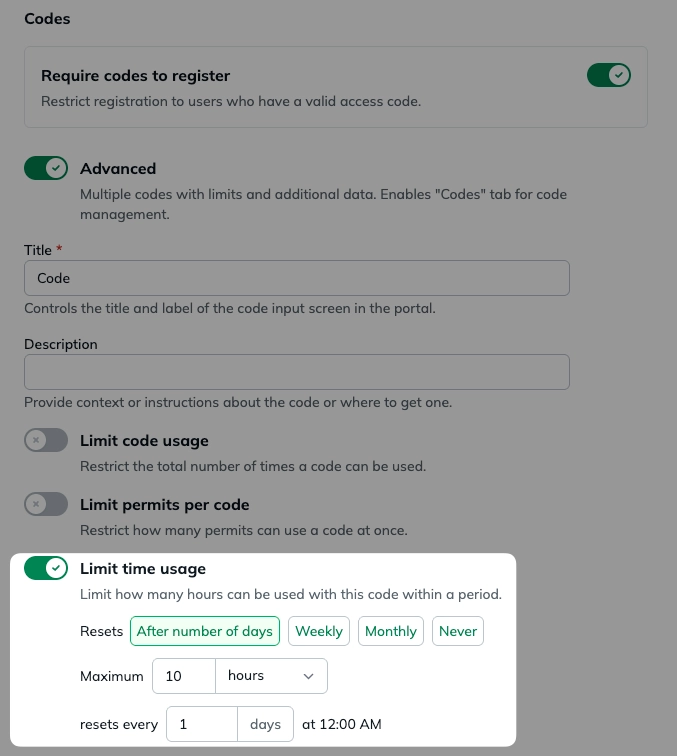
Example: a code has a 10-hour limit. A two-hour permit with two license plates uses four hours of that code’s allowance. Six hours remain for the period.
Periods & Resets
Maximum Permit Limit, Repeat Vehicle Limit, Time per Vehicle, and Time per Code use a period.
- Weekly: Resets on the weekday selected in the rule.
- Monthly: Resets at the beginning of each calendar month.
- After a number of days: Uses a rolling calendar-day window. There is no single fixed reset date.
- Never: Does not reset.
Tenant Usage Controls
Tenant limits let you apply usage controls to a specific tenant.
There are two levels of tenant controls:
Tenant Limits on a Permit Type
Use them to: set an allowance for one tenant in one Permit Type.
Where they apply: only to that tenant’s permits in the selected Permit Type.
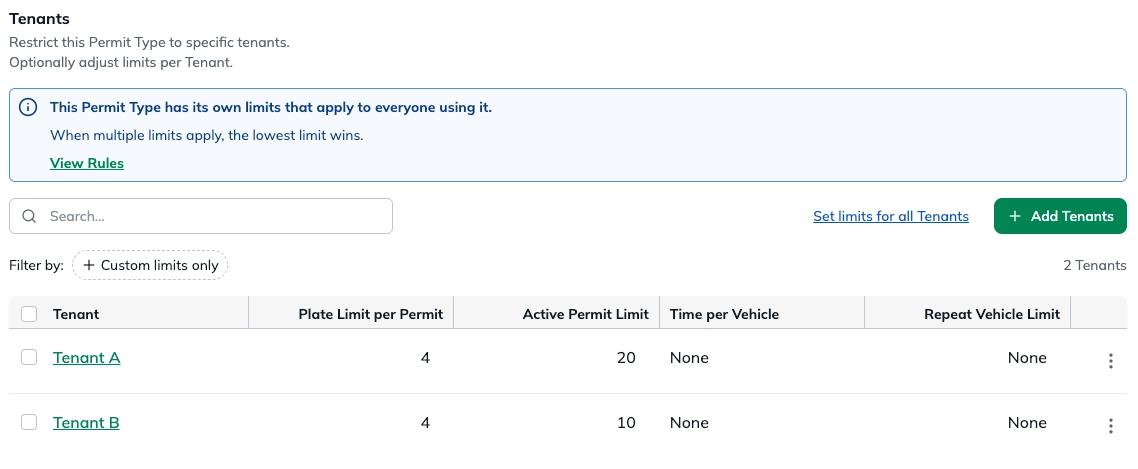
Example: tenant A can have an Active Permit Limit of 80 in a Visitor Permit Type, while Tenant B has a different limit. Both tenants’ permits still count toward the Permit Type and location limits.
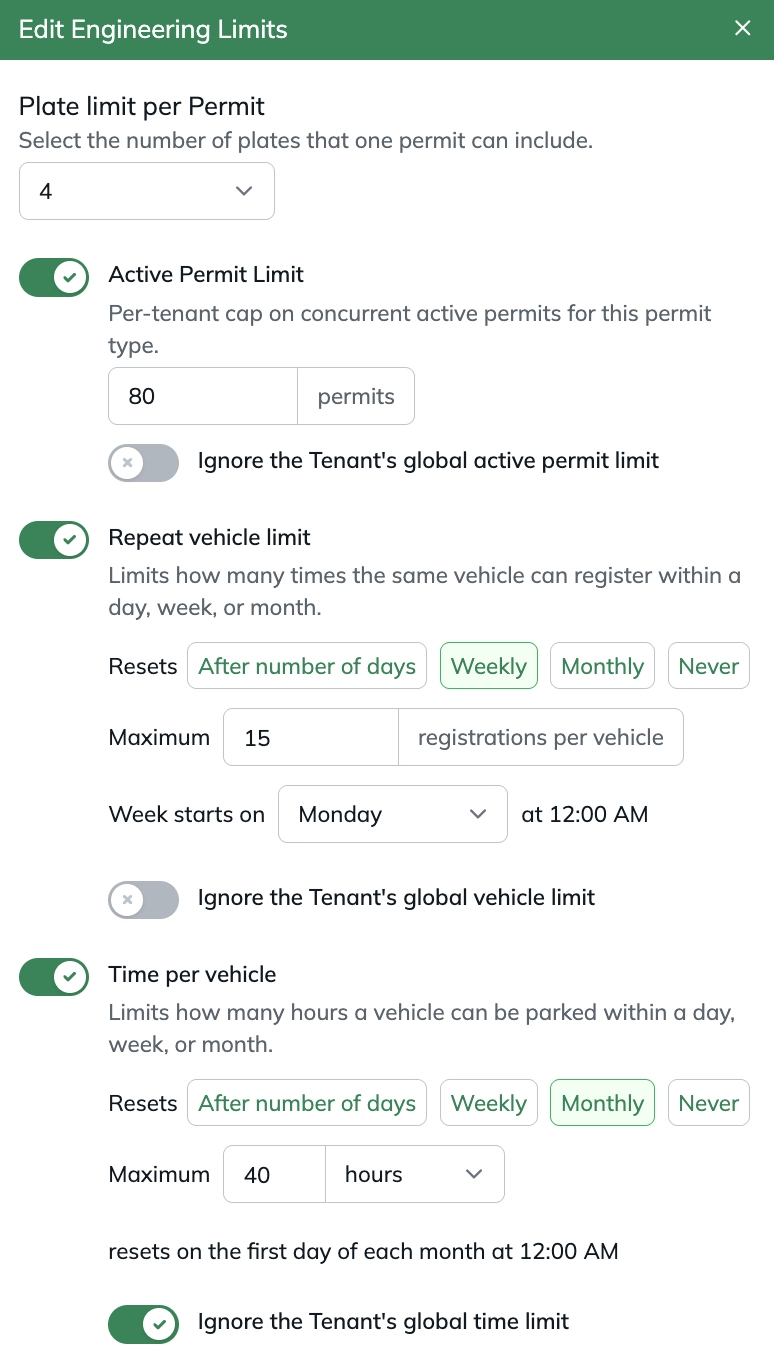
Available controls include:
- Plate Limit per Permit
- Active Permit Limit
- Maximum Permit Limit
- Repeat Vehicle Limit
- Time per Vehicle
Global Tenant Limits
Use them to: set one allowance for a tenant across all Permit Types.
Where they apply: all Permit Types used by that tenant.
To configure them:
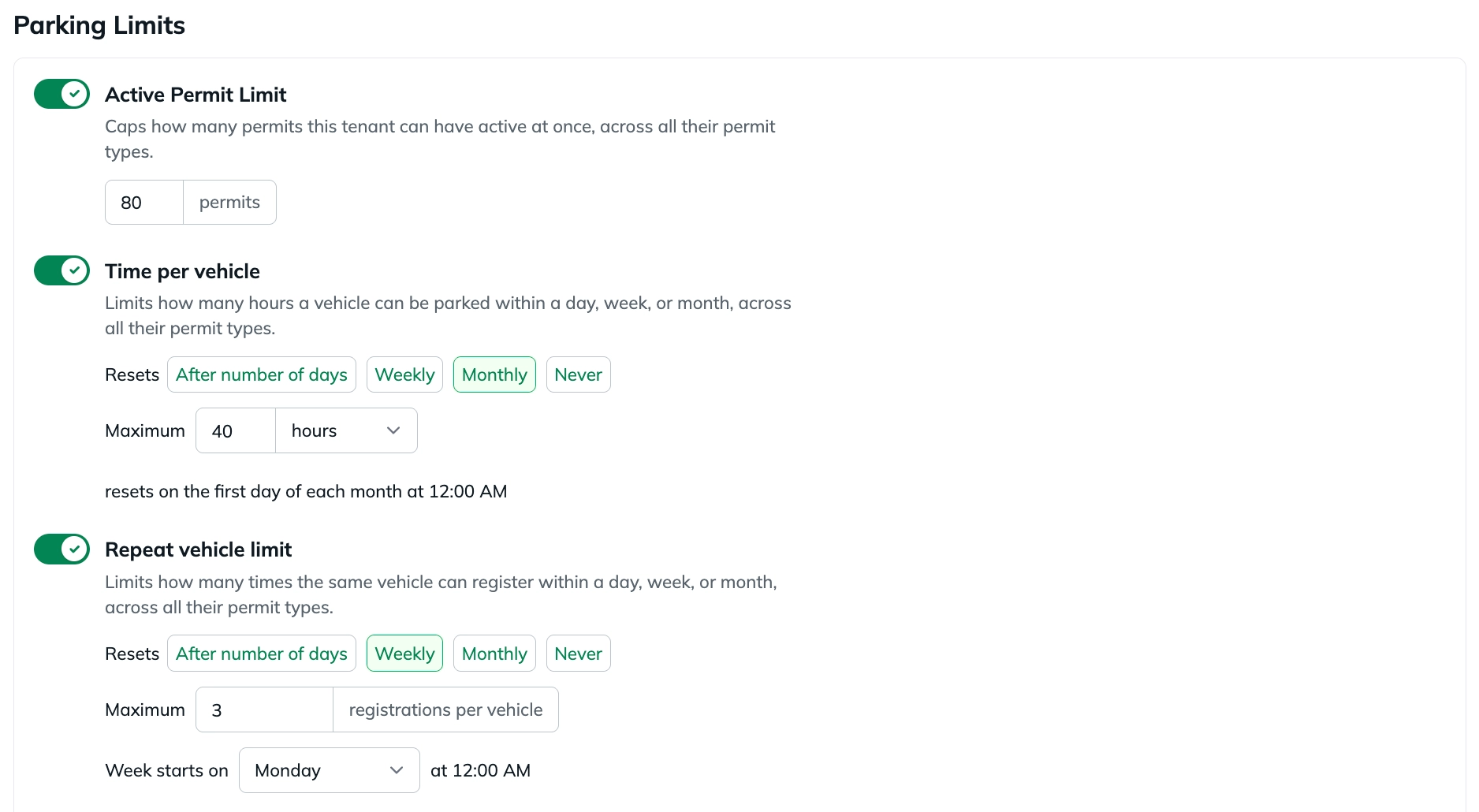
- Open Tenants and select the tenant.
- Open the Parking Limits tab.
- Configure the applicable Active Permit Limit, Repeat Vehicle Limit, and/or Time per Vehicle.
Examples:
- An Active Permit Limit of 80 allows the tenant up to 80 overlapping permits across all Permit Types.
- A Repeat Vehicle Limit of 3 per week allows a license plate up to three permits across all of the tenant’s Permit Types that week.
- A Time per Vehicle limit of 40 hours per month allows a license plate up to 40 hours of parking across all of the tenant’s Permit Types that month.
This is useful when you want an overall allowance to follow a tenant regardless of which Permit Type it uses.
Tenant Limits on Permit Type vs. Global Tenant Limits
A tenant limit on a Permit Type and a Global Tenant Limit can both apply to the same permit registration. The registration must meet both rules.
For Active Permit Limit, Repeat Vehicle Limit, and Time per Vehicle, you can choose to Ignore the Tenant’s global limit on the tenant’s Permit Type configuration. This excludes the matching global tenant rule for that Permit Type.
Example:
- Global Tenant Time per Vehicle Limit: 20 hours/month
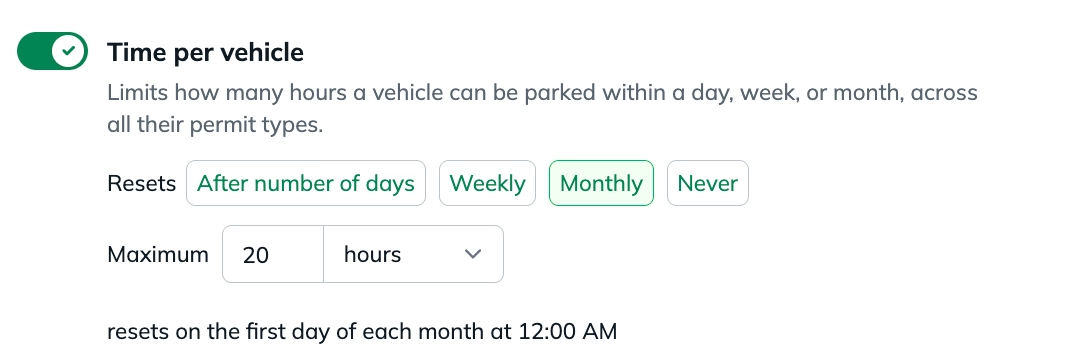
- Tenant limit on this Permit Type: 40 hours/month
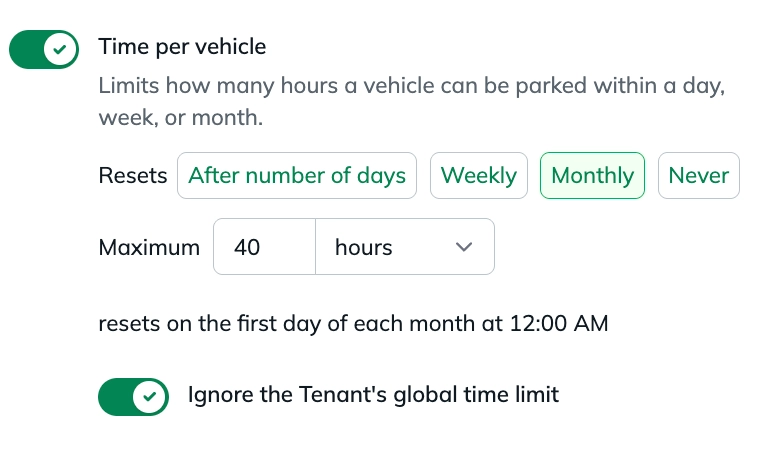
Normally, both rules apply and the global 20-hour rule is reached first. When Ignore the Tenant’s global time limit is enabled, the global rule is not used for permits from this Permit Type. The tenant’s 40-hour Permit Type limit still applies, along with every other applicable rule.
Location Usage Controls
Active Permit Limit
Use it to: keep a parking location from being overbooked.
Where it applies: all Permit Types, tenants, and events using that location.
How it works: the limit counts permits that overlap at the location at the same time.
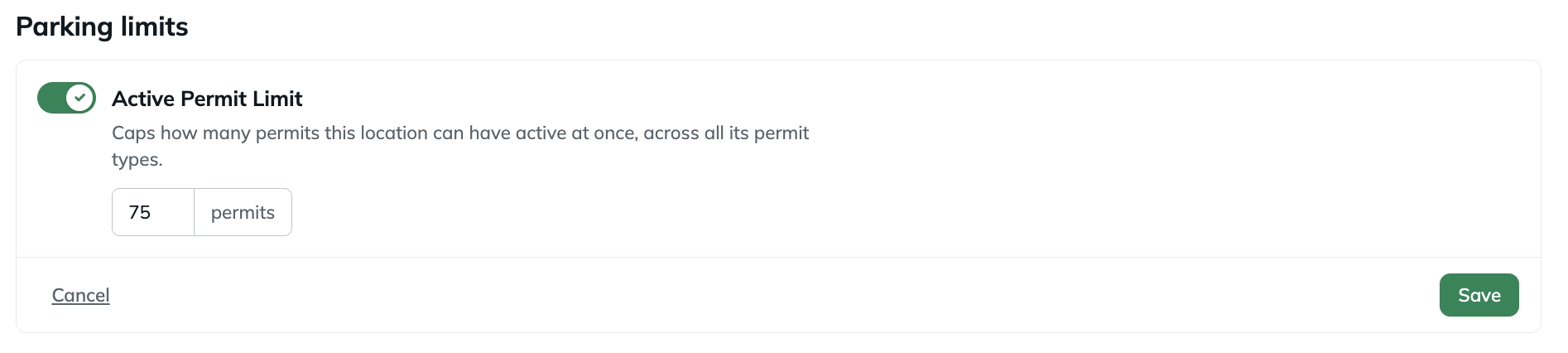
Example: a location has 75 spaces and an Active Permit Limit of 75. When 75 permits overlap at a given time, another permit cannot be issued for that time, regardless of its Permit Type, tenant, or event.
How Usage Controls Stack
Usage Controls protect different things. A permit registration must meet every rule that applies to it.
Active Permit Limit Example
Suppose you have:
- Location: 75 active permits
- Permit Type: 50 active permits
- Tenant on Permit Type: 20 active permits
The tenant can have up to 20 overlapping permits through that Permit Type. Those permits also count toward the Permit Type and location limits.
Even if the tenant has room under its 20-permit limit, registration can still be blocked when the Permit Type has 50 overlapping permits or the location has 75.
Repeat Vehicle Limit Example
Suppose the same license plate is subject to:
- Permit Type: 5 permits/month
- Tenant on Permit Type: 3 permits/month
- Tenant Global: 2 permits/month
All three rules apply. The vehicle can start up to two permits that month because the global tenant rule is reached first.
If the tenant configuration for the Permit Type is set to Ignore the Tenant’s Global Vehicle Limit, the global 2-per-month rule does not apply to that Permit Type. The Permit Type’s 5-per-month rule and the tenant-on-Permit-Type’s 3-per-month rule still apply. The vehicle can then start up to three permits that month through that Permit Type.
Repeat Vehicle Limit Example
Suppose the same vehicle is subject to:
- Permit Type: 5 permits/month
- Tenant on Permit Type: 3 permits/month
- Tenant Global: 2 permits/month
The effective allowance is 2 permits/month, because all three rules apply and the global tenant rule is currently the most restrictive.
A tenant limit on the permit type rule can be configured to ignore the Tenant's Global Vehicle Limit. If the global 2/month limit is ignored, the Permit Type's 5/month and tenant-on-permit-type's 3/month rules still apply, resulting in an effective limit of 3 permits/month.
Ignoring the tenant's global limit does not override the Permit Type's own rule.
Time per Vehicle Example
Suppose you have:
- Permit Type: 20 hours/month
- Tenant on Permit Type: 10 hours/month
- Tenant Global: 8 hours/month
The vehicle is effectively limited to 8 hours/month.
If the tenant limit on the permit type configuration is set to ignore the Tenant's Global Time Limit, the 8-hour global limit no longer applies. The Permit Type and tenant limit on the permit type limits still do, making the effective allowance 10 hours/month.
Time per Vehicle Example
Suppose the same license plate is subject to:
- Permit Type: 20 hours/month
- Tenant on Permit Type: 10 hours/month
- Tenant Global: 8 hours/month
All three rules apply. The vehicle can use up to eight hours that month because the global tenant rule is reached first.
If the tenant configuration for the Permit Type is set to Ignore the Tenant’s Global Time Limit, the global 8-hour rule does not apply to that Permit Type. The Permit Type’s 20-hour rule and the tenant-on-Permit-Type’s 10-hour rule still apply. The vehicle can then use up to 10 hours that month through that Permit Type.
Which Control Should I Use?
A simple way to choose the right control is to think about what you're trying to restrict:
Related: Availability & Timing Rules
Usage Controls manage capacity and usage. Availability & Timing Rules manage when registration is available and how soon a vehicle can start another permit.
These rules are configured per Parking Option and work alongside the Parking Option’s Start and Expiry Rules.
Limit when users can register for this option
Use Limit when users can register for this option to control when users can submit a registration for a Parking Option.
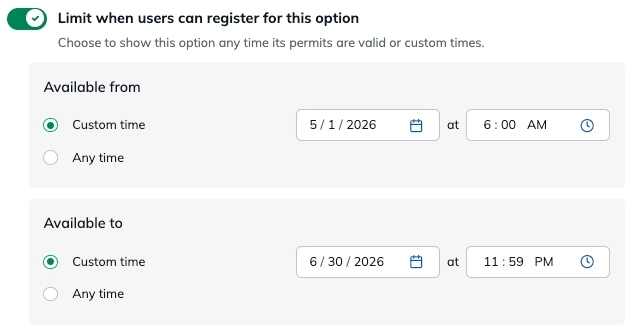
This is separate from the Parking Option's Start and Expiry Rules, which determine when the resulting permit is valid.
You can set an Available from and/or Available to boundary. Depending on the Parking Option's configuration, you can:
- Align availability with the earliest or latest valid parking time
- Set a custom date and time
- Select Any time to leave a boundary open
Example: Registration can be available from May 1–June 30, even if some permits are valid for parking at a later date.
Schedule recurring availability
Enable Schedule recurring availability when registration should only be available during specific recurring days or hours.
You can configure:
- Daily: apply the same registration hours each day.
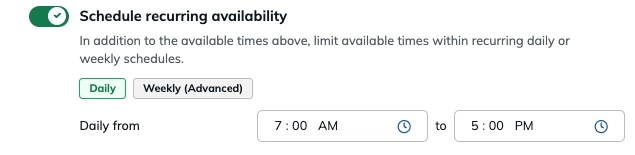
- Weekly (Advanced): select specific days and configure different hours for each day.
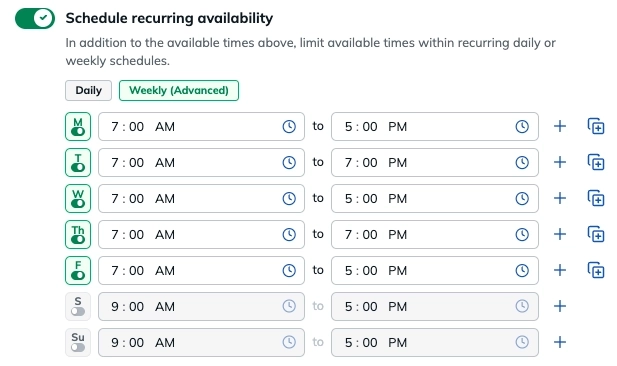
Example: Allow users to register only Monday–Friday from 7:00 AM–5:00 PM.
Recurring availability can also be combined with Available from and Available to boundaries.
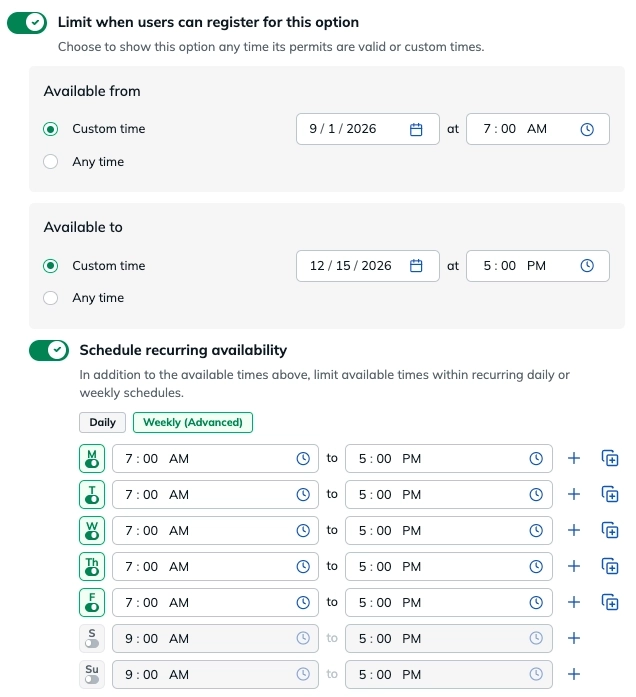
Example: Make registration available from September 1–December 15, but only Monday–Friday from 7:00 AM–5:00 PM during that period.
Minimum Time Between Permits for Each Guest
Use Minimum time between permits for each Guest to require a waiting period before the same vehicle can start another permit.
Set the gap in minutes, hours, or days. The gap is measured from the end of the earlier permit to the start of the next permit.
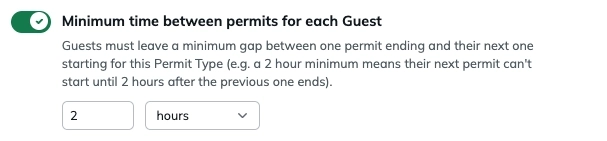
Example: If the minimum time is 2 hours and a vehicle’s permit ends at 1:00 PM, the next permit for that vehicle cannot start before 3:00 PM.
How These Relate to Usage Controls
- Availability → When a Parking Option can be registered for
- Minimum time between permits → How soon the same vehicle can start another permit
- Maximum Permit Limit → How many permits can start during a period
- Repeat Vehicle Limit → How many permits the same license plate can start during a period
- Time per Vehicle → How much parking time the same license plate can use during a period
- Time per Code → How much parking time can be used through one registration code
- Active Permit Limits → How many permits can overlap at the same time
Together, these controls help manage both when parking is available and how parking is used.
Was this article helpful?
That’s Great!
Thank you for your feedback
Sorry! We couldn't be helpful
Thank you for your feedback
Feedback sent
We appreciate your effort and will try to fix the article